Does Anyone Else Use Microsoft RMS?

I think not, which leads to a dearth of searchable content when I encounter an issue.

My latest round of technical snafus that I’ve encountered with Microsoft’s digital rights management software for Windows 2003 revolve around the fact that I’d like to upgrade the server to Windows Server 2008.  I’d love even more to port it to the 64 bit Windows Server 2008 R2, but I gave up on ever getting that to work.

However I did get a virtual lab install of the server to upgrade to regular old 32 bit Server 2008, except that RMS on 2008 runs off of SQL (express) 2005.  Unfortunately my existing install of RMS was running on the old MSDE 2000.  After making sure that the SQL upgrade worked, I upgraded MSDE on the server to Express and everything seemed to run okay, except that occasionally the DRMS_Logging service wouldn’t start.  I’d start it back, and at some point in time it would stop (sometimes stopping right away after I tried to start it).  Finally, I couldn’t get it to start at all (to be fair to myself I figuring it was a timing issue with IIS since cycling IIS seemed to get the RMS service to start, though obviously this turned out to be a coincidence).

When I first looked at the server I noticed that I was getting ‘file full’ SQL errors, which I figured came about because SQL Express was hitting it’s space limit.  When I looked at the MOM/Onepoint database I noticed that it had grown quite large.  I looked up how to purge data and the posts all seemed to go back to the ‘sqlagent’ running a process that ran a stored procedure that handled the ‘grooming’.  After messing around with the SQL Express installer a bit looking for the agent install I’d found that although the SQL agent at least appeared to be included with MSDE 2000, it’s not with 2005.  I then went through the database and determined that the procedure ‘dbo.MOMXGrooming’ was the winner.  After executing that and shrinking the DB and files it cleared up the SQL space issue.  Yet still, the DRMS_Logging service wouldn’t start.

I looked at the logging database for RMS and it was rather large as well, but with no built in grooming procedure I just dropped the table and recreated it (backing up first of course).  The service still wouldn’t start, no errors, no nothing.  I figured that even though it wasn’t working it was worth looking at the web management piece to see if it would let me configure it.  When I tried to pull it up, the site kicked out an error saying that it could not run because the event viewer was full – the application event log had filled up with SQL space errors.  After purging the log, the service started and people could get into their documents yet again.
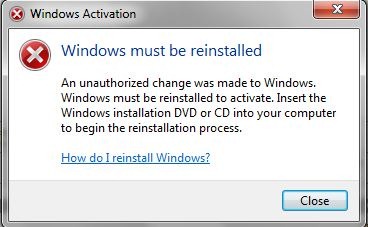
Windows Activation

Ed Bott is digging into the technology behind Windows Activation, and one of the more amusing bits was when he had to use a cracking program to fix a file he had intentionally damaged since Microsoft’s own tool was unable to fix it.  My own amusing story was when I was trying to properly activate our work systems.  Since the volume management auto-registration program (KMS) won’t run until at least 25 Windows 7 systems have tried to register (why? I’ve no idea), I decided to fall back on our key (MAK) that we can use alternatively in limited use.  The key had worked for me fine before when I used the GUI, but when I used the command line ‘slmgr.vbs’ Windows still showed as being un-activated.  I wanted to use the command line so that I wouldn’t have to visit each system to register them, so I tried to force it on my own computer by using the undocumented ‘rearm’ switch.  I figured it would either work, or reset to default settings at which point I could try putting the key back in, but no, I got this instead:

Capture‘Unauthorized’?  By who?

It goes without saying that the OS in fact does NOT have to be reinstalled, but instead the licensing cache has to be cleared out (it also turns out that an extra command is required to register through the command line).  If Microsoft is going to be a bit overbearing in preventing piracy, couldn’t they at least make sure their anti-piracy protections work?  It aggravates me all the more since I’ve always made sure we are properly licensed and I would think that somewhere in the bucket of money we send them every year they could find the funds to fix stuff like this.

Sykes and AT&T

Our AT&T sales rep got us a pretty good deal on a new MPLS implementation, but the install left a lot to be desired.  Our previous MPLS install was handled by DPSciences and they did a great job of making sure all the technical aspects were handled and of making sure all the billing issues that accompany such an install were handled as well.  However, for the new implementation AT&T used Sykes and they did a wretched job of managing the install:

  • We weren’t given proper ETAs for installs.  This resulted in the install at one site being done improperly and the install at a different site not being scheduled at all.  This the led to a sticky billing issue where we were billed for circuits that were ready to be turned up, but couldn’t be utilized until the last circuit was brought up.
  • I asked the Sykes tech if our Class of Service was brought over.  The lack of response should have told me that something was up and it turned out that it wasn’t applied at all by their incompetent tech.  The lack of response didn’t register any higher in my mind since their tech never responded to me about anything.
  • They didn’t bring over an important custom configuration for one of our routers as I nagged them to do.  How hard is it to save a router configuration and then apply it to a different router that’s the same make and model?!?
  • It took a week of incessant nagging on my part in trying to figure out what was wrong with our new MPLS implementation before they eventually got back to me to let me know that there were routing errors only because one of our old MPLS routers was left on.  Yes, I guess I should have known, but would it have killed them to let me know that couple days sooner?

As a side note, we had an AT&T MIS Internet circuit put in by ACS and they did a great job as well.  There are plenty of other great AT&T outsource choices besides the apparently awful Sykes.

(UPDATE 3/3/11: Since so many users from AT&T have apparently taken an interest in this post I figured I would elaborate on the one aspect of the situation.  On our original MPLS implementation, which had chronic maintenance issues, we had a class of service configuration to accommodate primarily voice traffic, and secondarily Outlook and RDP/ICA traffic.  Despite e-mails and phone calls, Sykes decided not to bring this over and they closed out the install, meaning that I had to go through (several) change procedures before it was operating properly).

SSL on the Nortel BCM

All of these concepts are probably familiar to those in the know, but I wasn’t able to put the pieces together until I upgraded to Windows 7 and found that without a properly working SSL configuration Windows 7 wasn’t going to load up the BCM system administration utility.

The documentation for the Nortel BCM states to go to the ‘Maintenance’ section, and then ‘Maintenance Tools’ (well it doesn’t say that but I found it anyway), and then ‘Upload a Certificate and Private Key’.  However, where do I get these?  I knew that the certification would come from my Windows based CA that runs in the domain, but there wasn’t a tool to generate a certificate request on the BCM.  My clue was that a private key, the key used to generate the request, had to be uploaded as well.  I then used the version of openssl on the BCM to do the work, though in hindsight it probably would have been easier to use a newer version installed elsewhere. 

First, upon doing a version check of openssl I noticed that the working directory that it was looking for (‘c:\openssl\ssl’) didn’t exist.  I manually created the directory and did the work from there.  Eventually I discovered that the ‘openssl.cnf’ file (that was called something else and buried elsewhere on a different drive) that shipped with the BCM was lacking and I ended up brewing my own with the following settings:

[ req ]
default_bits        = 2048
default_keyfile         = privkey.pem
encrypt_rsa_key        = no
default_md        = sha1
distinguished_name        = req_distinguished_name
x509_extensions         = root_ca_extensions

[ req_distinguished_name ]
0.organizationName = Organization Name (company)
organizationalUnitName = Organizational Unit Name (department, division)
emailAddress = Email Address
emailAddress_max = 40
localityName = Locality Name (city, district)
stateOrProvinceName = State or Province Name (full name)
countryName = Country Name (2 letter code)
countryName_min = 2
countryName_max = 2
commonName = Common Name (hostname, IP, or your name)
commonName_max = 64

[ root_ca_extensions ]
basicConstraints        = CA:true

I then executed a command along the lines of the following and filling out the ‘form’ that comes up:

openssl req -new -newkey rsa:1024 -nodes -keyout bcmkey.pem -out bcmreq.pem

I then FTP’d (bad form, but I already said that a different method would have been better) the two files up to my file server.  I put the ‘req’ file through my Windows CA (‘Base 64 encoded’, and unlike the HP ILO card I didn’t need the whole chain) to get the web server certificate and I then uploaded them both up the BCM and viola, the SSL warning error messages were gone and the manager was happy under Windows 7.

Let Down a Little by 7

Although my limited Windows 7 experience thus far has been largely positive, even my meager deployment of a half dozen PCs has turned up two irritations:

  • Firstly, I started up four of the HP systems we purchased and two of the systems started in a different manner than the other two.  The ‘different’ systems had startup menu options that appeared out of sync.  It still got the job done, but it was disconcerting that even such a limited number of Windows PCs couldn’t be bothered to start up in a consistent manner (“did someone use this before me?”).
  • Secondly, my user base is pretty anxious for their new PCs so I was hoping to avoid a time sink by simply upgrading Windows 7 Pro (the OEM version which ships on the units) to Windows 7 Enterprise (the SA version we’re entitled to run).  Doing this would save me time from having to rebuild the application and driver base to support the system.  Unfortunately I got a big old error message stating that ‘Windows 7 Pro cannot be upgraded to Windows 7 Enterprise’.  Why the frick not?  Is it that involved of a process to copy that small handful of code that differentiates the versions?  It can upgrade from Vista Business, why not 7?

My only other peeve is the nasty mess that is the control panel.  I figured this would be one of the big things addressed with the upgrade, but that half baked idea is a direct port of the original Vista implementation.  I wait with baited breath in anticipation of finding another landmine.