MAS 90 Patch Issue

I recently decided to be brave and install a hotfix rollup/service pack to our MAS 90 4.3 install.  I believe we were on patch 3 and I would be installing patch 20.  My goal was to clear up some oddball Windows 7 issues that we were having (the exact nature of which I cannot recall unfortunately).

After installing the patch everything looked okay.  It appeared that the client upgrade was somewhat optional since it only upgraded the help files (though I did it anyway just to be sure), and when opening some of the companies in the database I got an unexpected upgrade notice (unexpected since the system was patched and not upgraded):
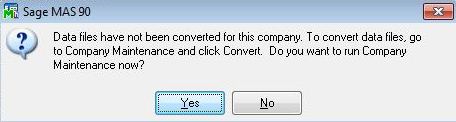
For all but one of the companys, getting this “Data files have not been converted for this company” message wasn’t an issue.  However for one of the companies in our database we would receive this error, go through ‘Company Maintenance’ to upgrade it, then receive a message that said that there was nothing to upgrade, but then get the “have not been converted” message again when trying to go into the database.

What was odd was that under ‘Company Maintenance’, the ‘Common Information’ module for the company was listed as version “4.09” (which so far as I know, wasn’t even a production release version of MAS 90).  Every other module in every other company was listed as “4.30”.  I am unsure as to how MAS works in the background, but when I looked at the files through a hex editor it did appear that they reporting that they were version “4.09” (however in hindsight it would appear that this value was ‘pushed in’ rather than ‘pulled out’ of the tables).  Ordinarily it would probably be worth restoring the data and trying to figure out what went wrong, but for reasons I’ll not get into the application had already been used for more than two weeks (outside of that company of course).

As luck would have it, I needed to perform some operating system tests a couple weeks earlier and had a test copy of the virtual server that hosts our MAS installation and the data was from before the upgrade.  I tried copying the tables over and a couple other little things, but after nothing worked out I decided to try and upgrade the test copy of the database to see why the upgrade to that company failed, only…it didn’t.  It worked fine.  I then copied over that copy of the company over to the production MAS.

What happened next was rather odd, but MAS is a bit of an odd product.  The version number was still reported as “4.09”, but in poking around I opened the ‘Copy’ utility under ‘Company Maintenance’ with the thought that I would copy another company’s ‘Common Information’ set over to see if the version stayed the same.  I thought better of it again (this wasn’t the first time I mulled it over) and I canceled out and then for whatever reason the version number for ‘Common Information’ was properly reported and the upgrade error went away.
Upgrading to Server 2008

I’m a little late on this, but it has more to do with what’s supported on Server 2008 and having the time to upgrade the servers.  Of note are the two bigger issues when upgrading:

  • One of my servers was formally a Server 2000 box and as such doesn’t have the largest hard drive.  Now existing as a Server 2003 virtual machine I decided to boost the drive size.  This required boosting the drive size in Hyper-V, changing the simple dynamic disk to a basic disk by using this Microsoft tip (sorry I don’t remember which site gave me the tip), and then finishing up with PartedMagic.
  • Next up is removing/uninstalling Powershell.  Since my disks were low on space I was rather diligent about removing the compressed patch uninstall files under the Windows directory so I didn’t have the Powershell uninstall sitting around anywhere. Since I had no other choice, I went through a lengthy process of building an un-SP* Server 2003 virtual machine just so I could get the Powershell uninstall files.  To save others the pain I am sharing the files here.

As well, perhaps due to the age of the OS on the box, the Frontpage extensions had a nasty hook into the OS with the constant upgrade error of “setup has detected that Frontpage server extensions is installed on this computer” blah blah blah.  I paced through the tip here and the one that did it was deleting everything in the registry labeled “web server extensions”.

Free Hold Music

At a couple points in the past I’ve attempted to scrounge around on the Internet for royalty free hold music that we could use at my place of work.  I must admit that I was never successful, but I also must admit that I can’t remember why.  If I had to guess I would say that it was for reasons similar to my hunt for royalty free artwork: the quality was poor, or the license allowing for it’s free use was dubious at best.

When looking for royalty free music there’s two hurdles: is the song itself public domain, and is the recording.  The former is easy enough as anything more than a hundred years old is pretty safe, but the latter is quite tricky since recordings have been known to fade in and out of ‘public domain’ access.

However a vendor that I called on had quite horrible hold music and I was pondering their logic of torturing their customers thus when I realized that their work around was to record MIDI music of public domain songs.  Well ‘song’ was more like it, and the MIDI chip they used sounded like it had been resurrected from the mid-80s, but the approach was novel!

A better approach than the one they used is to use classical harpsichord music (the tinny sound of that instrument doesn’t lose much in the translation to MIDI) and then use one of the commercial MIDI-to-WAV/MP3 converters (or if your so given, record the MIDI output on your computer).

Remote Voicemail on the BCM

For quite a while we have relied on dialing ‘**’ when dialing into the BCM to check our voicemail. However, our snazzy new touchscreen cellphones don’t handle ‘clicking’ the asterisk in a quick, consecutive fashion. I looked around on the Internet for an alternative, but then realized that I could just use the number that is used by the voicemail system as it’s ‘forward’ destination (ours is 300, but yours may be different).